Talk to us
LiveA product of PSTM AI Pvt. Ltd.

YouFarm AI

Smart Solutions for Modern Farming

YouFarm AI is a phone app that helps an Indian farmer decide what to grow, look after the crop, find the best price and sell it, all in Hindi, Marathi or English, with an AI assistant you can simply talk to.

  • Hindi · Marathi · English
  • Android + Web
  • Live government mandi prices
  • We never handle your money
  • We never touch your money. Payments happen directly between buyer and seller. We say so clearly at checkout.
  • We do not invent numbers. Prices come from government and weather data, and recommendations from your own records and reference tables. When something is missing, the app says so instead of guessing.
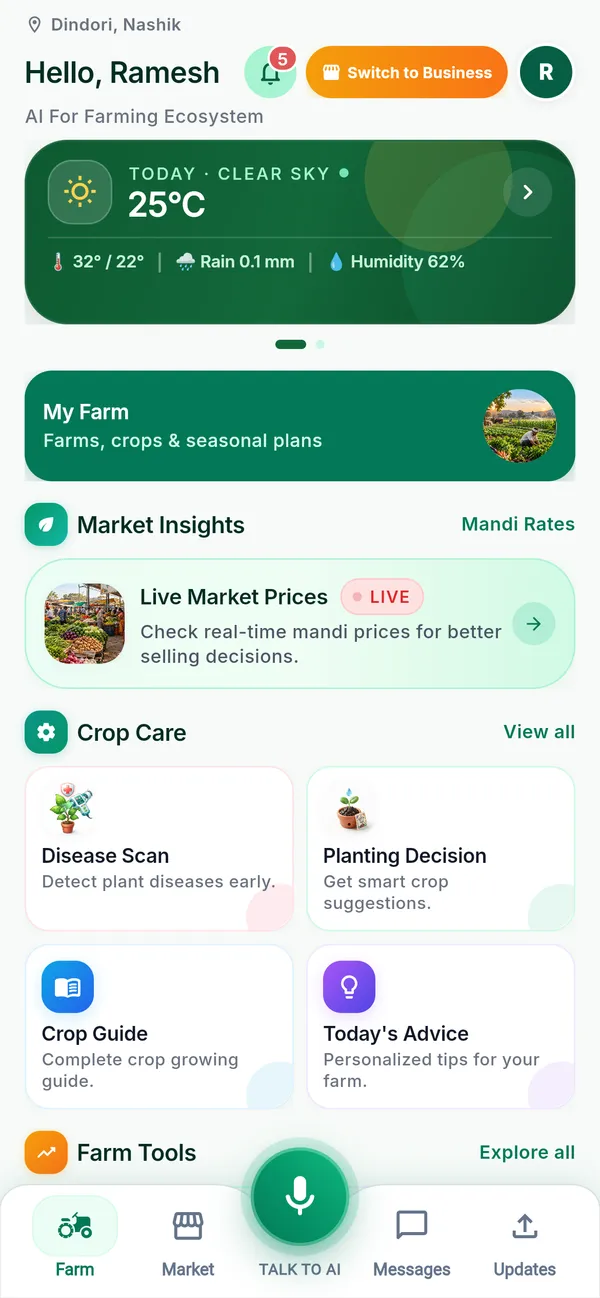
YouFarm AI home screen with today's weather at the farm, live market prices, and shortcuts to Disease Scan, Planting Decision, Crop Guide and Today's Advice
Why

The problem we set out to solve

A farmer today makes a dozen high-stakes decisions every season, and most of them are made with partial information.

  • What should I plant this year? Last year's neighbour-advice may mean half the village plants the same crop and the price collapses at harvest.
  • Is this spot on the leaf a disease, and what do I spray? A wrong or unnecessary spray costs money and harms the soil.
  • Which mandi (wholesale market) pays the most today, and is it worth the diesel to go there?
  • Where do I buy good inputs, rent a tractor, or find a buyer for my produce?
  • What did I actually spend and earn this season? Most of it lives in a notebook, or in memory.

The tools that help with these questions are scattered across many apps, most of them in English, most built for people who are not farmers.

YouFarm AI puts them in one app, one login, your own language.

In plain words

What YouFarm AI is, in plain words

Think of YouFarm AI as three things in one:

  1. A farm diary and advisor. You draw your field on a map, tell the app what you are growing, and it keeps your records and tells you what needs doing today.
  2. A marketplace and price board. You see real government mandi prices and you can buy inputs, rent machinery, or sell your produce to people nearby.
  3. A helper you can talk to. You can ask questions by typing, by sending a photo, or just by speaking, and the assistant answers, or does the task for you after you say “yes”.

It works on Android, and in a web browser at youfarm.ai/app. It speaks English, Hindi (हिन्दी) and Marathi (मराठी).

How it works

Three simple steps

  1. Sign in with your phone number.

    You get a one-time code on WhatsApp (or SMS). No passwords to remember.

  2. Set up your farm.

    Walk around your field with the phone, or tap the corners on a satellite map. The app works out the area and which village, taluka (sub-district) and district you are in. Add what you are growing, or leave it for later.

  3. Use only what you need.

    Open the tool you want from the home screen: prices, weather, a leaf scan, advice for today. Everything uses the same farm you set up, so you do not type the same thing twice.

Features

What you can do with it

Plan

Decide what to plant

What to Plant ranks crops for your field and the coming season. It looks at your soil, water, area and what you grew before, then adds two things most advice leaves out:

  • The expected price at harvest time, not today's price.
  • A rough profit per acre: expected yield × price − cost, with the source of each number shown. If the app does not have enough information, it says “no estimate” instead of guessing.

It also shows what your neighbours are planting at taluka and district level, and warns you if too many people are choosing the same crop, because a crowded crop often means a falling price.
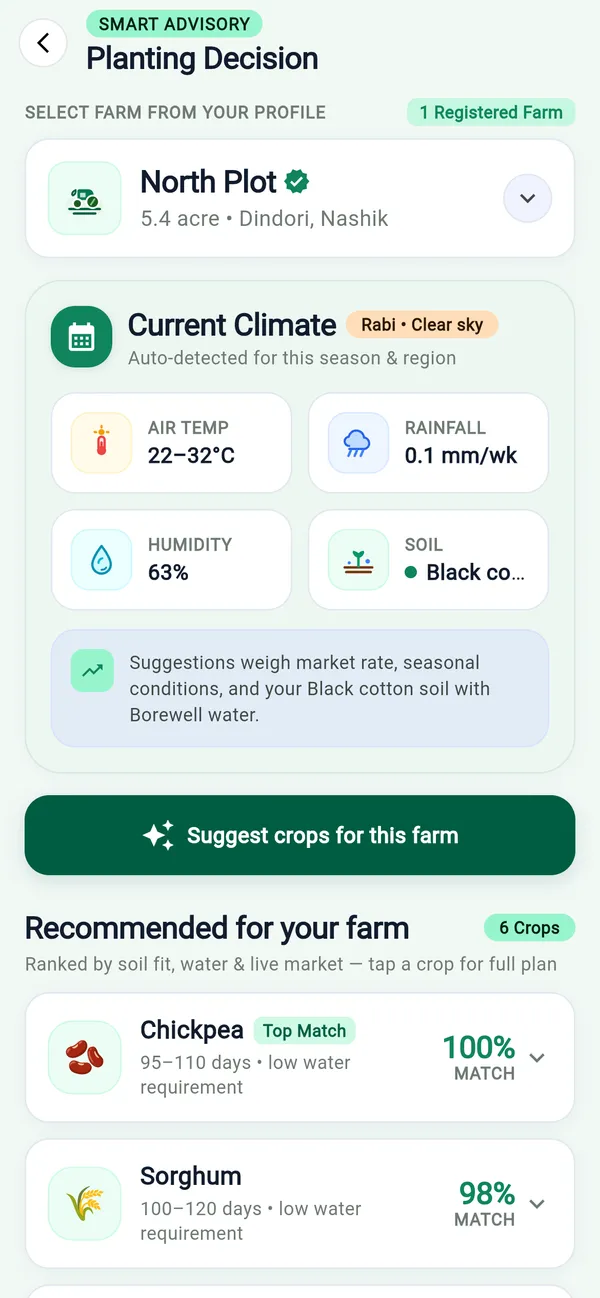
Planting Decision screen showing the farm's current climate and crops ranked for the field, with chickpea as the top match

Protect

Protect your crop: leaf Disease Scan

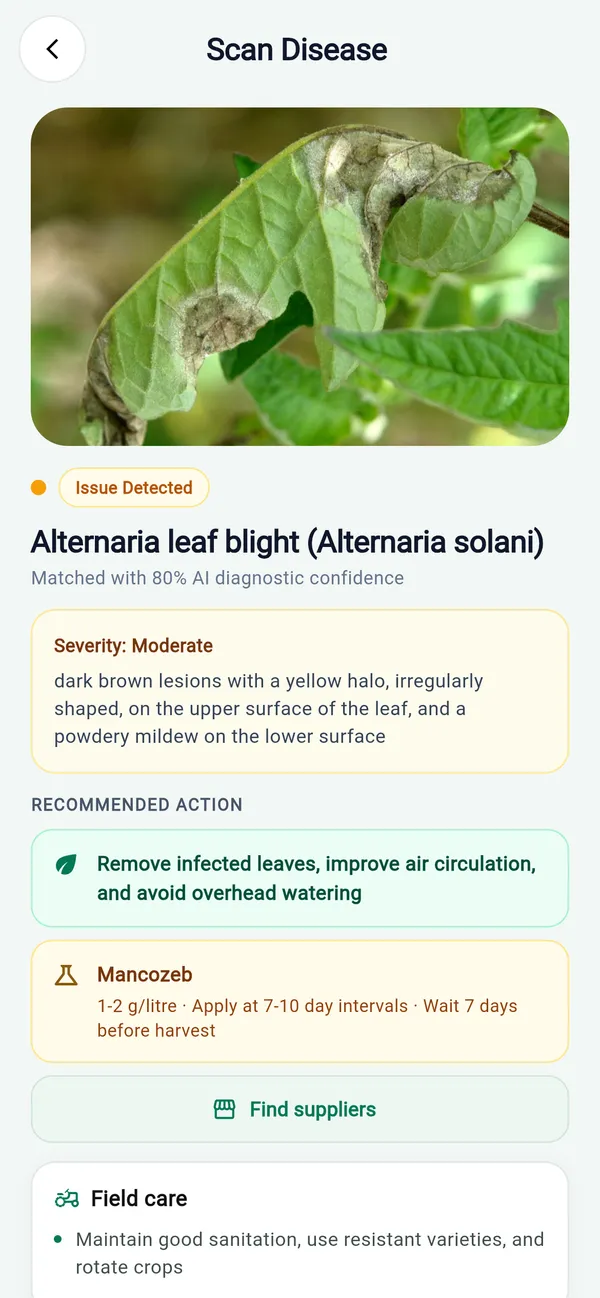
Take a photo of a sick leaf. YouFarm AI tells you the likely disease, how sure it is, and what to do, with organic options first, then chemical options with safety precautions. A button then finds nearby sellers of the recommended product.

We built three safety checks in, because a wrong answer costs a farmer real money:

  1. It first checks that the photo is actually a plant.
  2. If it is not confident enough, it will not name any chemical.
  3. It suggests only registered products.
Disease Scan result naming Alternaria leaf blight with its confidence level, a field-care action, a treatment with precautions and a Find suppliers button

Price

Know the price: live mandi prices

Official government mandi (wholesale market) prices, refreshed every hour.

  • Search by crop, state, district or mandi.
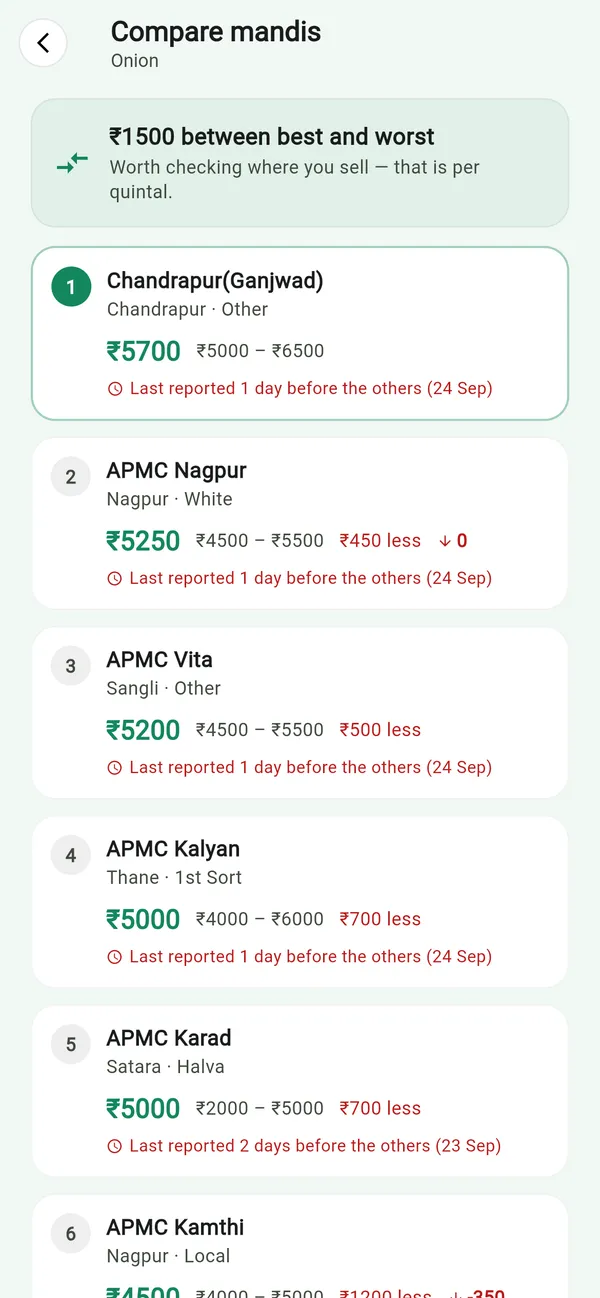
  • Compare mandis: see who pays the most and how much you would lose by going to a nearer one, so you can tell when the difference is not worth the trip.
  • Price alerts: set a target (“tell me when onion goes above ₹2,000”) and get one notification when it happens, not one every hour.
  • “Did I get a fair price?” Record a sale in your expenses and the app compares it with the mandi rate on that day.
Mandi comparison for onion, listing markets from the highest price down and how much less each one pays

Advise

Weather and Today's Advice

  • Weather: now, the next 7 days, and what the last week actually did, for your own farm's location.
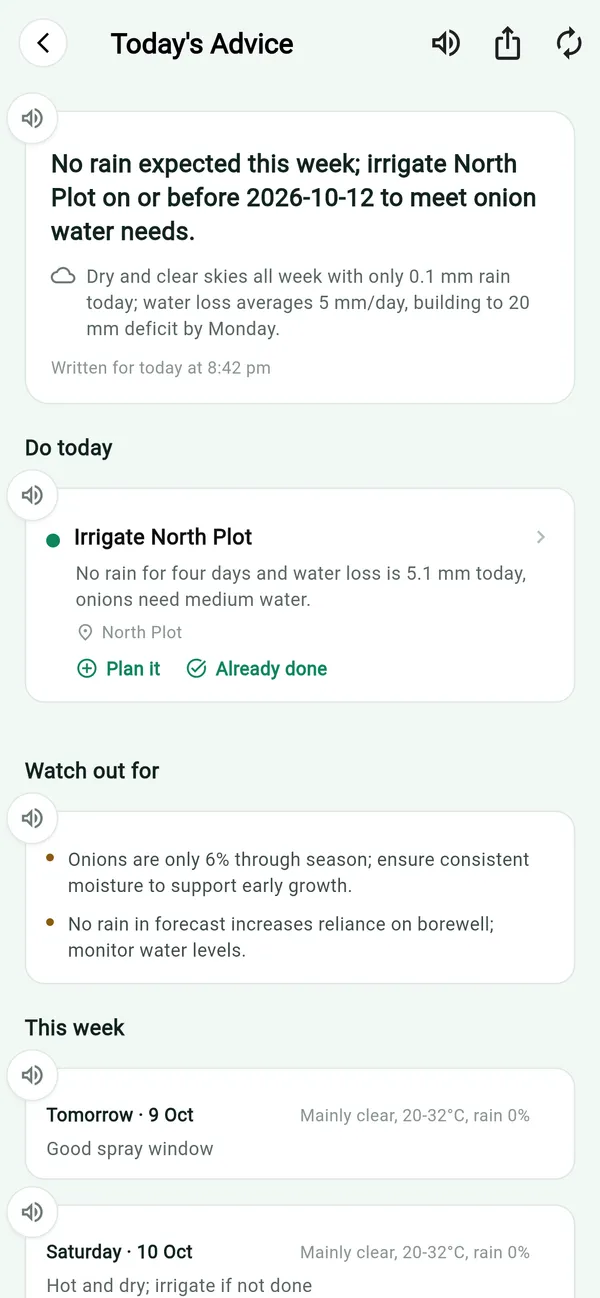
  • Today's Advice: a daily plan written from your crops, their growth stage and the forecast at your field (when to spray, when to irrigate, what to prepare). One tap adds a task to your activity list. It never makes you wait: if the AI is slow, a simpler rules-based plan appears immediately.
Today's Advice with an irrigation plan for the field, a task for today, things to watch out for and the week's spray windows

Record

Keep your records: activities, calendar and expenses

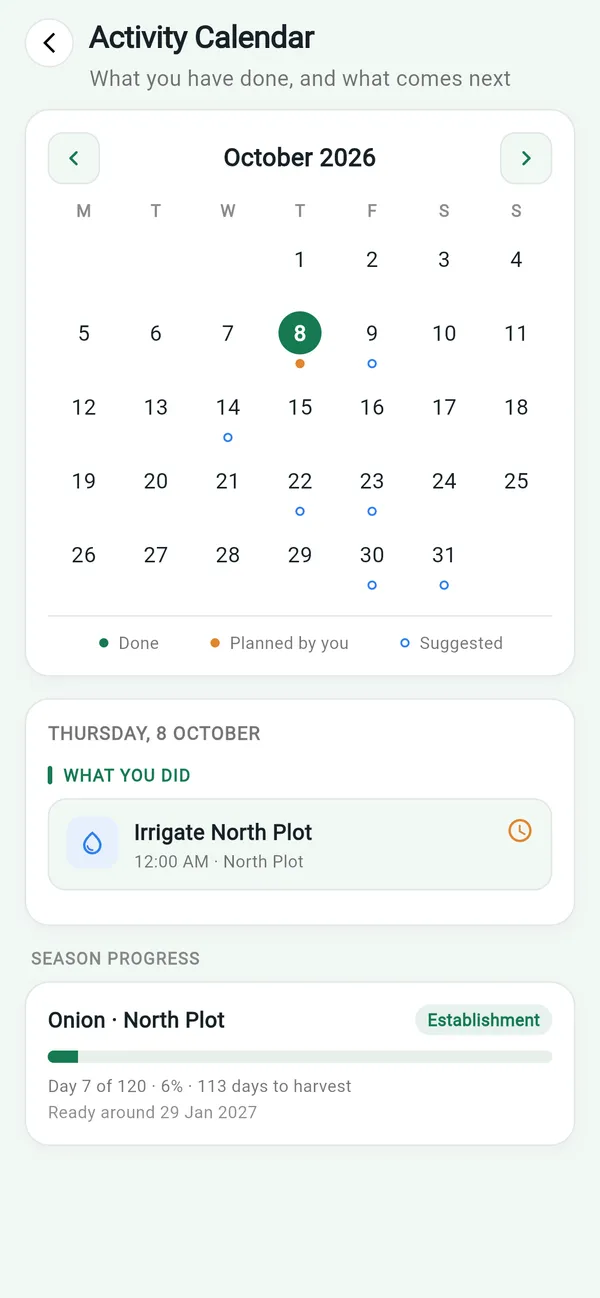
  • Activity Manager and calendar: log sowing, irrigation, spraying, weeding, harvest and more. The calendar also shows suggested tasks for the season, which you can add with a tap. Reminders arrive the day before, on the day and when something is overdue.
  • Expense Manager: track spending and earnings for the farm, your business, machinery and personal use, with simple charts. You can even say it aloud: “kal 1200 rupaye ka urea liya” and the entry is filled in for you to confirm.
Activity calendar for October marking done, planned and suggested tasks, with season progress for an onion plot

Learn

Crop Guides and Government Schemes

  • Crop Guide: for each crop, the duration, sowing time, water and soil needs, a step-by-step timeline, an itemised cost card, common diseases and recommended products.
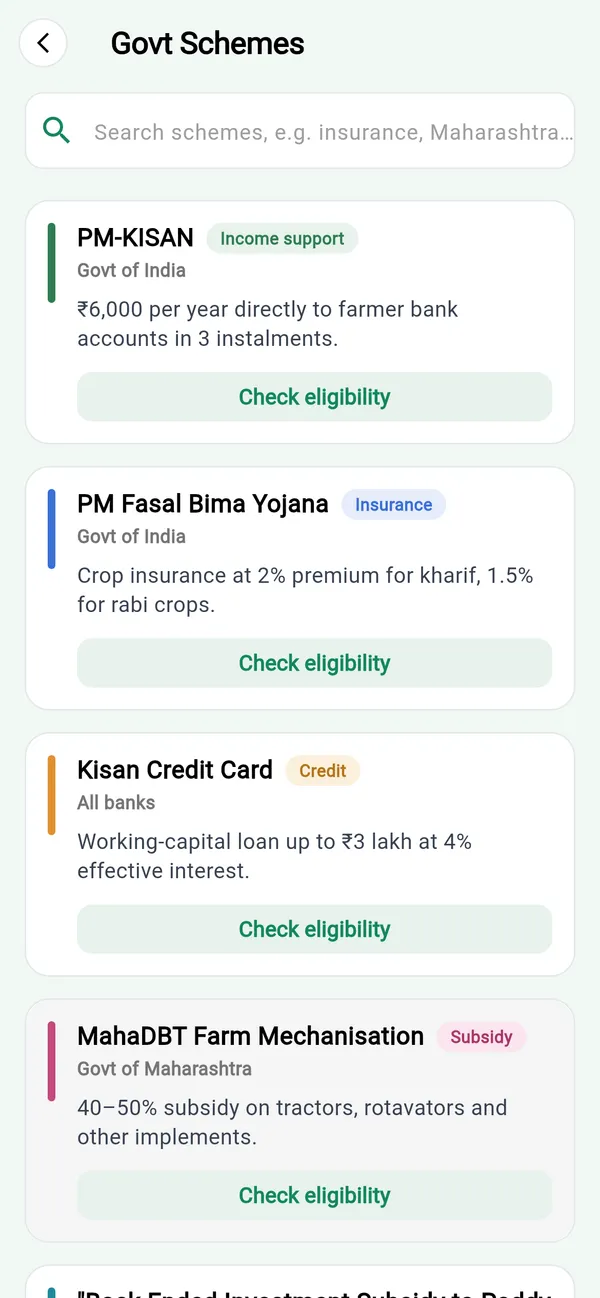
  • Government Schemes: a searchable directory of around 480 schemes, with who is eligible, which documents you need, how to apply and a helpline.
Government Schemes directory listing PM-KISAN, PM Fasal Bima Yojana and Kisan Credit Card, each with a Check eligibility button

Trade

Buy and sell: the YouFarm Market

A marketplace built for how farm trade really works.

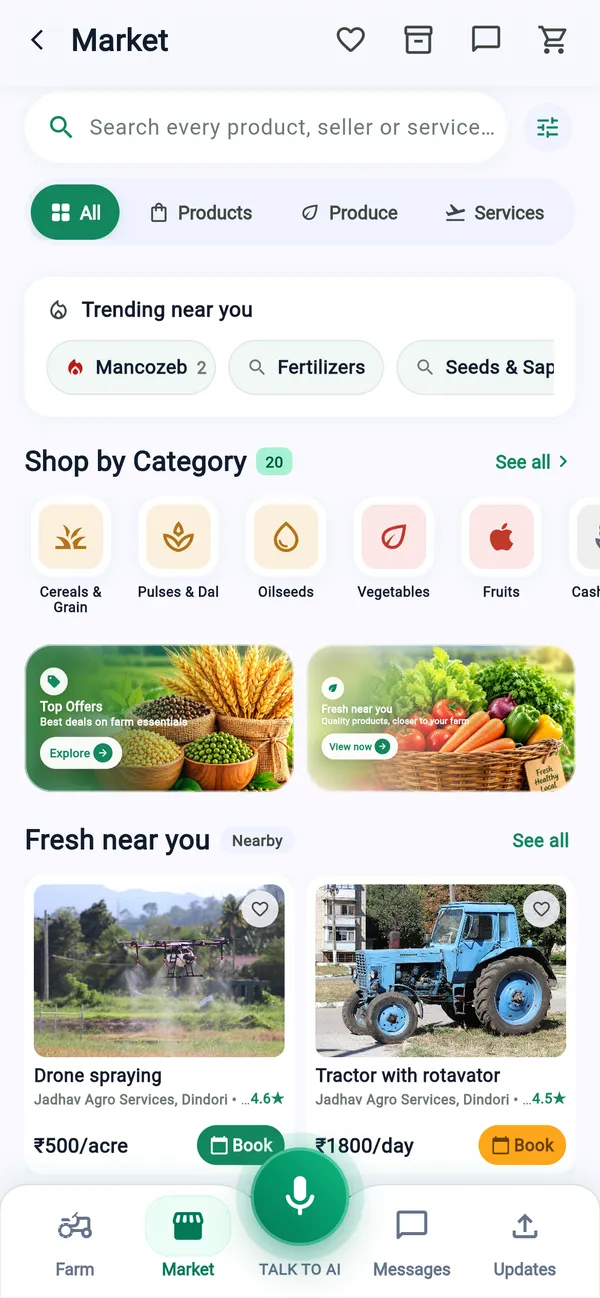
  • Buy: seeds, fertiliser, tools, machinery on rent, services, and fresh produce, from sellers near you. Call or WhatsApp the seller, send an enquiry, or order through the cart.
  • Sell: open a shop from your own profile, list products, services, machinery or your harvest, and manage stock, orders, questions and reviews. You can also post what you want to buy (“40 quintals of soybean”) and let sellers come to you.
  • Trust: reviews can only be written after a real order or enquiry. Sellers have a reliability score based on how they actually behave. Businesses can earn a Verified badge. Anything suspicious can be reported.
  • Fair prices: each listing shows whether it is above or below the nearest mandi price.

Important, and deliberate: YouFarm never touches your money. Buyer and seller settle payment directly, in cash or UPI (India's instant bank-to-bank payments). The app records the order and what each side says about payment, but it does not hold, send or collect funds.

YouFarm Market with search, product categories, trending items and machinery for rent from sellers nearby

Ask

Talk to YouFarm AI

An assistant you can type to, send photos to, or talk to hands-free.

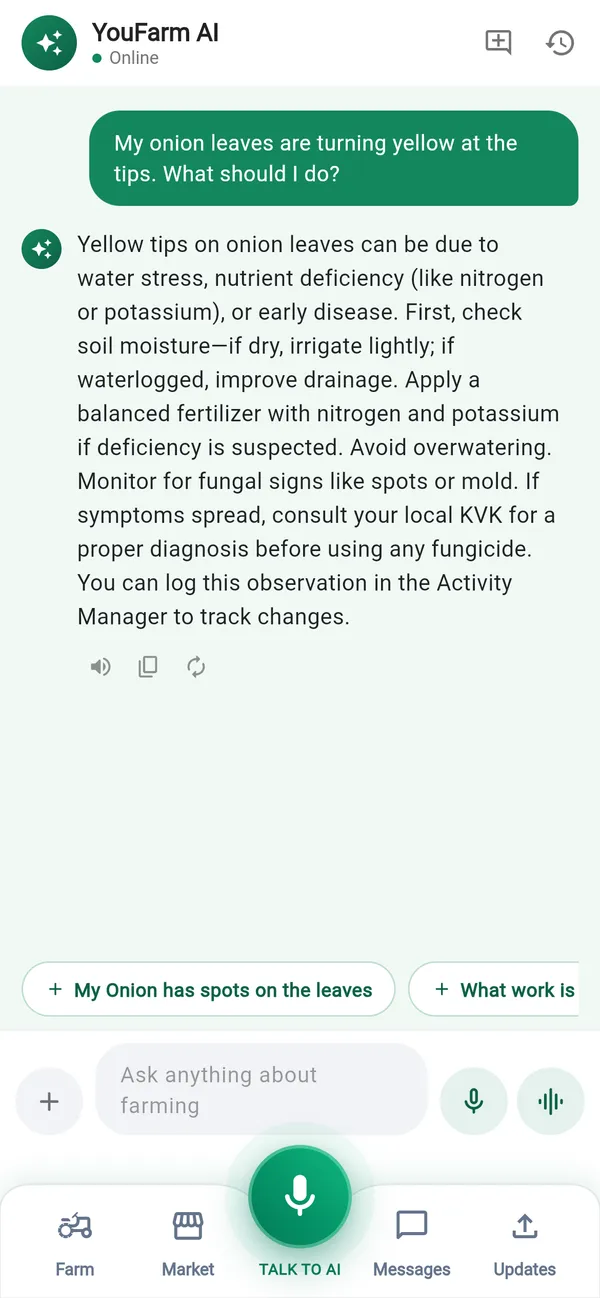
  • Ask a farming question and get an answer that uses your farm's details.
  • Say what you did (“I watered the field for two hours”) and it prepares the entry.
  • Ask for prices, weather or advice, or ask it to open a screen for you.
  • Send a leaf photo for a diagnosis, using the same safety checks as the scan.

It asks before it acts. Anything that would change your records appears as a card you must confirm. Nothing is saved behind your back.

Chat with the YouFarm AI assistant answering a question about yellow tips on onion leaves

Connect

Stay connected: Messages and Status

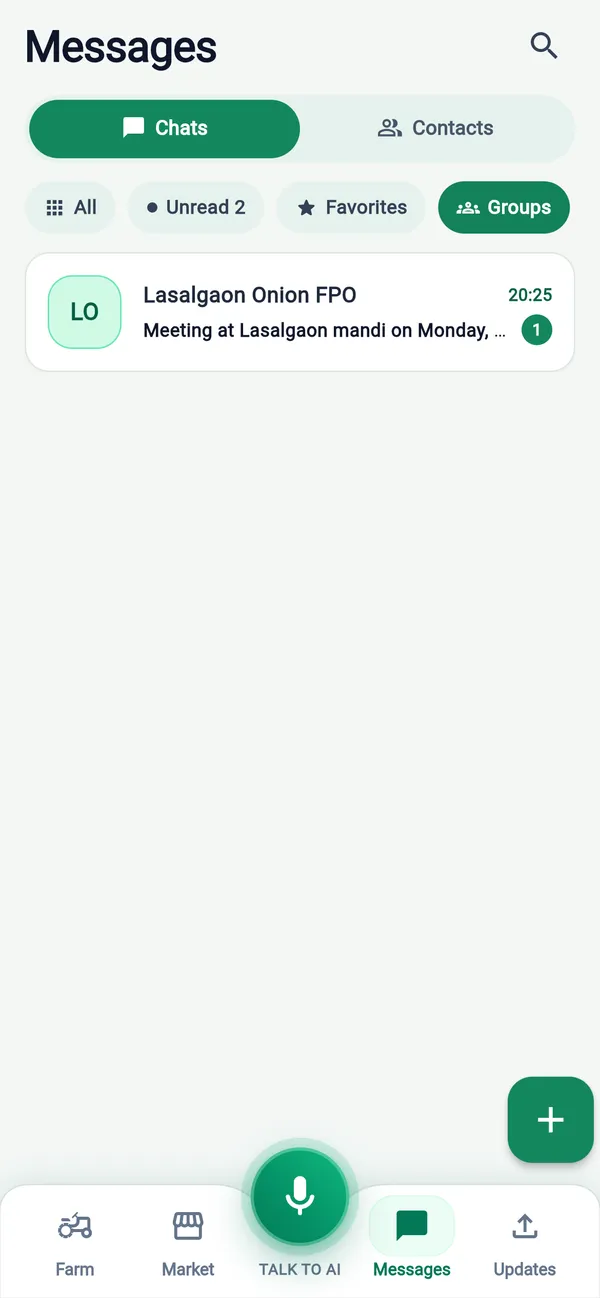
WhatsApp-style chat with individuals, groups and communities: text, photos, voice notes, documents and location. It opens instantly even with no network, because messages are stored on your phone. You can also post a 24-hour Status (“8 crates of tomatoes left today”).

Messages screen showing a farmer producer organisation group chat

Notifications. Weather, mandi alerts, orders, reminders and messages arrive as notifications, and tapping one opens the right screen.

Story

A season with YouFarm AI

An illustrative example, not a real customer.

  1. Planning

    Ramesh maps his 4-acre field. The app places it in his taluka. He opens What to Plant, sees soybean ranks first on his soil and water, but also sees that half the taluka is already planning soybean and the price has fallen in past seasons. He compares it with another crop that earns a similar profit with less competition, and adds it to his farm with one tap.

  2. Growing

    Each morning Today's Advice tells him whether tomorrow's rain makes it a bad day to spray. He notices spots on a leaf, photographs it, and gets a diagnosis with an organic remedy first. He taps Find suppliers and orders the recommended product from a dealer ten kilometres away.

  3. Selling

    At harvest he compares mandi prices, sets an alert for his target, and sells when it fires. He records the sale, and the app tells him he got a fair rate. His whole season, costs and income, is already in one place.

Our word

What we promise

  • We never touch your money.

    Payments happen directly between buyer and seller. We say so clearly at checkout.

  • We do not invent numbers.

    Prices come from government and weather data, and recommendations from your own records and reference tables. When something is missing, the app says so instead of guessing.

  • You stay in control.

    The assistant proposes, you confirm.

  • Your language comes first.

    English, Hindi and Marathi, throughout.

  • Respect for your data.

    You can delete your account in the app. Reports, blocking and a grievance process are built in.

See the YouFarm AI Privacy Policy and Terms and Conditions.

FAQ

Frequently asked questions

  • Who is YouFarm AI for?
    Farmers first. It also serves the small businesses around them: input dealers, machinery owners, produce traders and farmer groups (FPOs).
  • Which languages does it support?
    English, Hindi and Marathi, across the whole app.
  • Where can I use it?
    On Android phones (Google Play) and in any web browser at youfarm.ai/app.
  • Do I need to be good with phones or English?
    No. You can speak to the assistant, and every screen is available in Hindi and Marathi. The set-up is a phone number and a code.
  • Is the disease diagnosis always right?
    No tool is. YouFarm AI shows how confident it is, refuses to suggest a chemical when it is unsure, and gives field-care advice alongside the treatment. For serious or spreading problems, also consult a local agri expert. Treat it as a strong first opinion.
  • Where do the prices come from?
    Mandi prices come from the Government of India's open data platform (data.gov.in, AGMARKNET) and are refreshed hourly. Weather comes from Open-Meteo.
  • Does YouFarm take a cut of my sales or handle my payments?
    No. Buyers and sellers pay each other directly. YouFarm does not hold or move money.
  • Can the AI change my records without asking?
    No. It always shows a confirmation card first.
  • Can I delete my account and data?
    Yes, from inside the app.
  • How do I get help or report a problem?
    Use Help & Support in the app, or email support@youfarm.ai. Complaints about a listing or seller go to our Grievance Officer at grievance@youfarm.ai.
Glossary

Words used on this page

Glossary of farming and payment terms
WordMeaning
MandiA government-regulated wholesale market where farmers sell produce.
APMC / AGMARKNETThe market committees and the national system that publish daily mandi prices.
TalukaA sub-district administrative area.
FPOFarmer Producer Organisation, a company owned by farmers.
UPIIndia's instant bank-to-bank payment system.
Verified badgeA mark shown on businesses whose details were reviewed by our team.
OTPA one-time code sent to your phone to prove it is you.

Get started

Download YouFarm AI on Google Play, or open it in your browser at youfarm.ai/app. Sign in with your phone number and set up your farm in a few minutes.

Questions, partnerships or feedback about the app: support@youfarm.ai

Want software like this built for your own industry? Talk to us

Talk to us